


Download Microsoft Visio Premium 2010 – diagramming, data visualization, process management, workflow creation, SharePoint integration, business modeling
Overview
Microsoft Visio Premium 2010 is a comprehensive diagramming and business modeling tool designed for professionals who need to visualize complex processes, data flows, and organizational structures. The application enables users to create detailed diagrams that integrate real-time data from sources such as Excel and Microsoft SQL Server, transforming static visuals into dynamic, interactive representations. This capability supports better decision-making by allowing teams to analyze and interpret data more effectively across departments.
Targeted at enterprise users, project managers, IT architects, and business analysts, Visio Premium 2010 addresses the need for standardized, shareable, and scalable workflow documentation. Its integration with SharePoint Server 2010 allows organizations to deploy workflows directly into collaborative environments, ensuring alignment across teams and real-time monitoring of process execution. The app plays a significant role in the productivity software ecosystem by bridging the gap between conceptual planning and operational implementation.
Developed by Microsoft Corporation, the application reflects the company’s long-standing commitment to enterprise-grade tools. Although the developer did not provide additional technical details, the app’s release in 2010 and continued relevance in legacy systems suggest its enduring value in business environments. Real-world use cases include mapping IT infrastructure, designing business processes, and creating technical documentation for compliance and audit purposes.
Key Features & Functionality
- Dynamic, Data-Driven Visualization – Users can link diagrams to live data sources such as Excel and SQL Server, enabling automatic updates and visual enhancements like data bars and icons. This feature supports real-time insights without manual rework.
- Enhanced Process Management – The software allows the definition of sub-processes, rule-based logic, and validation checks to ensure consistency and accuracy in workflow design, reducing human error in process documentation.
- Seamless SharePoint Integration – Diagrams and workflows created in Visio can be exported directly to SharePoint Server 2010, enabling deployment, execution, and monitoring within a centralized collaboration platform.
- Comprehensive Web Sharing – Teams can share diagrams across divisions through web links, promoting transparency and alignment in large organizations without requiring software installation on every device.
- Rich Library of Templates and Tools – A wide range of pre-built templates and intelligent shapes accelerates diagram creation, helping users produce professional-quality visuals quickly and efficiently.
For example, a project manager can use dynamic data linking to visualize resource allocation across departments, with color-coded indicators reflecting real-time workload levels. Similarly, an IT architect might use the SharePoint integration to deploy a network diagram as a live workflow for monitoring system changes. These features collectively support efficient collaboration, process optimization, and data-driven decision-making in complex organizational settings.
Interface, UX & Performance
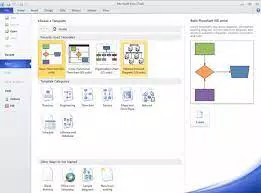
Microsoft Visio Premium 2010 features a traditional desktop interface with a ribbon-based layout, consistent with other Microsoft Office applications. The UI is structured around tool panels, a canvas workspace, and a sidebar for shape libraries and properties. Navigation is intuitive for users familiar with Microsoft’s ecosystem, though the learning curve may be steeper for new users without prior experience.
The application supports smooth interaction with large diagrams, though performance may vary depending on system specifications. Although the developer did not list formal performance metrics, the app is designed to handle complex diagrams with multiple layers and data connections. Responsiveness is generally reliable on mid-to-high-end Windows systems, but older hardware may experience delays when rendering large files.
Stability is maintained through Microsoft’s established software development practices. The application does not exhibit known crashes or frequent freezes under normal use conditions. However, compatibility with modern Windows versions beyond its original release may require additional configuration or compatibility mode settings. Overall, the UX prioritizes functionality over minimalism, making it suitable for professional use rather than casual interaction.
Platform Compatibility & Technical Requirements
Microsoft Visio Premium 2010 is available exclusively for the Windows platform. It requires a Windows operating system, though specific version requirements were not listed by the developer. The application has a file size of 2.2 GB, indicating a substantial installation footprint typical of full-featured desktop software.
Given its release date in 2010, the app was originally designed for Windows 7 and earlier versions. Modern Windows systems may support it through compatibility mode, but native performance and security updates are not guaranteed. The developer did not specify minimum hardware requirements or supported architectures beyond the platform.
Compatibility information was not fully disclosed. Users should verify system compatibility before installation, especially when deploying across enterprise environments. The lack of mobile or cross-platform availability limits accessibility, reinforcing its role as a desktop-centric productivity tool.
Pros and Cons
Pros
- Powerful data-driven diagramming with real-time updates from Excel and SQL Server
- Deep integration with SharePoint Server 2010 for workflow deployment
- Extensive library of templates and intelligent shapes for faster design
- Supports complex process modeling with validation rules and sub-processes
- Established reliability and stability in enterprise environments
Cons
- Not available for mobile or modern operating systems beyond Windows
- Large file size (2.2 GB) may be impractical for low-storage devices
- Outdated release date (2010) raises concerns about long-term support and security
- Limited documentation and community support due to age
- High price point of $299.00 for a legacy product
FAQ
Is Microsoft Visio Premium 2010 compatible with modern Windows systems?
While the application was released in 2010, it may run on newer Windows versions using compatibility mode. However, full functionality and security updates are not guaranteed.
Can I use Visio Premium 2010 on a Mac or mobile device?
No, the app is designed exclusively for Windows and is not available on macOS, iOS, or Android platforms.
Is Visio Premium 2010 secure to install and use?
As a legacy application, it may lack current security patches. Users should assess risks before deployment in sensitive environments.
What data sources can be linked to diagrams in Visio Premium 2010?
The software supports integration with Microsoft Excel and SQL Server for dynamic data visualization.
Are updates available for Visio Premium 2010?
Microsoft has discontinued updates for this version. Users are advised to consider newer alternatives for ongoing support and security.
Final Thoughts
Microsoft Visio Premium 2010 remains a powerful tool for organizations still relying on legacy systems and structured diagramming workflows. Its ability to integrate data, manage processes, and deploy workflows through SharePoint makes it a valuable asset in enterprise environments where standardization and documentation are critical. While its age and lack of modern features are notable drawbacks, its functionality continues to serve niche professional needs.
For project managers, IT teams, and business analysts working within established Microsoft infrastructures, the app offers a proven solution for visualizing complex systems. However, users should carefully evaluate compatibility, security, and long-term viability before adoption.
Download Microsoft Visio Premium 2010 now


